
🧠 AI with Python - 📊 Evaluate a Classifier using Confusion Matrix & Accuracy Score
Posted on: August 19, 2025
Description:
When building a machine learning model, it’s tempting to judge it solely based on accuracy — but accuracy doesn’t always tell the whole story.
That’s where the confusion matrix comes in.
What is a Confusion Matrix?
A confusion matrix is a table that compares the actual vs. predicted classifications made by a model.
- Rows → Actual class labels
- Columns → Predicted class labels
It breaks down predictions into four main categories:
- True Positive (TP) → Correctly predicted positive cases
- True Negative (TN) → Correctly predicted negative cases
- False Positive (FP) → Incorrectly predicted positive cases (Type I Error)
- False Negative (FN) → Incorrectly predicted negative cases (Type II Error)
Why Accuracy Alone Can Be Misleading
Accuracy = (Correct Predictions) / (Total Predictions)
While it’s an easy metric to calculate, it can be deceptive — especially in imbalanced datasets.
For example, if only 5% of your emails are spam, a model that always predicts “Not Spam” will still have 95% accuracy but is useless for detecting spam.
That’s why pairing accuracy with a confusion matrix (and other metrics like precision, recall, and F1-score) is a better approach.
Workflow Overview
Step 1 – Train the Model
We’ll train a Decision Tree Classifier using scikit-learn’s built-in Iris dataset.
from sklearn.datasets import load_iris
from sklearn.model_selection import train_test_split
from sklearn.tree import DecisionTreeClassifier

iris = load_iris()
X_train, X_test, y_train, y_test = train_test_split(
    iris.data, iris.target, random_state=42
)

model = DecisionTreeClassifier(random_state=42)
model.fit(X_train, y_train)
Step 2 – Generate Predictions
After training, we generate predictions for the test set.
y_pred = model.predict(X_test)
Tip: Always use test data (not training data) for evaluation to avoid biased results.
Step 3 – Evaluate with Confusion Matrix & Accuracy Score
We use scikit-learn’s confusion_matrix and accuracy_score to measure performance.
from sklearn.metrics import confusion_matrix, accuracy_score

cm = confusion_matrix(y_test, y_pred)
accuracy = accuracy_score(y_test, y_pred)
print("Confusion Matrix:\n", cm)
print("Accuracy Score:", accuracy)
Output:
Accuracy: 0.9474
Confusion Matrix:
 [[12  0  0]
 [ 0 12  1]
 [ 0  1 12]]
Step 4 (Optional) - Visualize the Confusion Matrix
A heatmap can make the results easier to interpret.
import matplotlib.pyplot as plt
import seaborn as sns

plt.figure(figsize=(5, 4))
sns.heatmap(cm, annot=True, fmt='d', cmap='Blues',
            xticklabels=iris.target_names,
            yticklabels=iris.target_names)
plt.xlabel("Predicted")
plt.ylabel("Actual")
plt.title("Confusion Matrix")
plt.show()
Example Output: Confusion Matrix - Logistic Regression on Iris
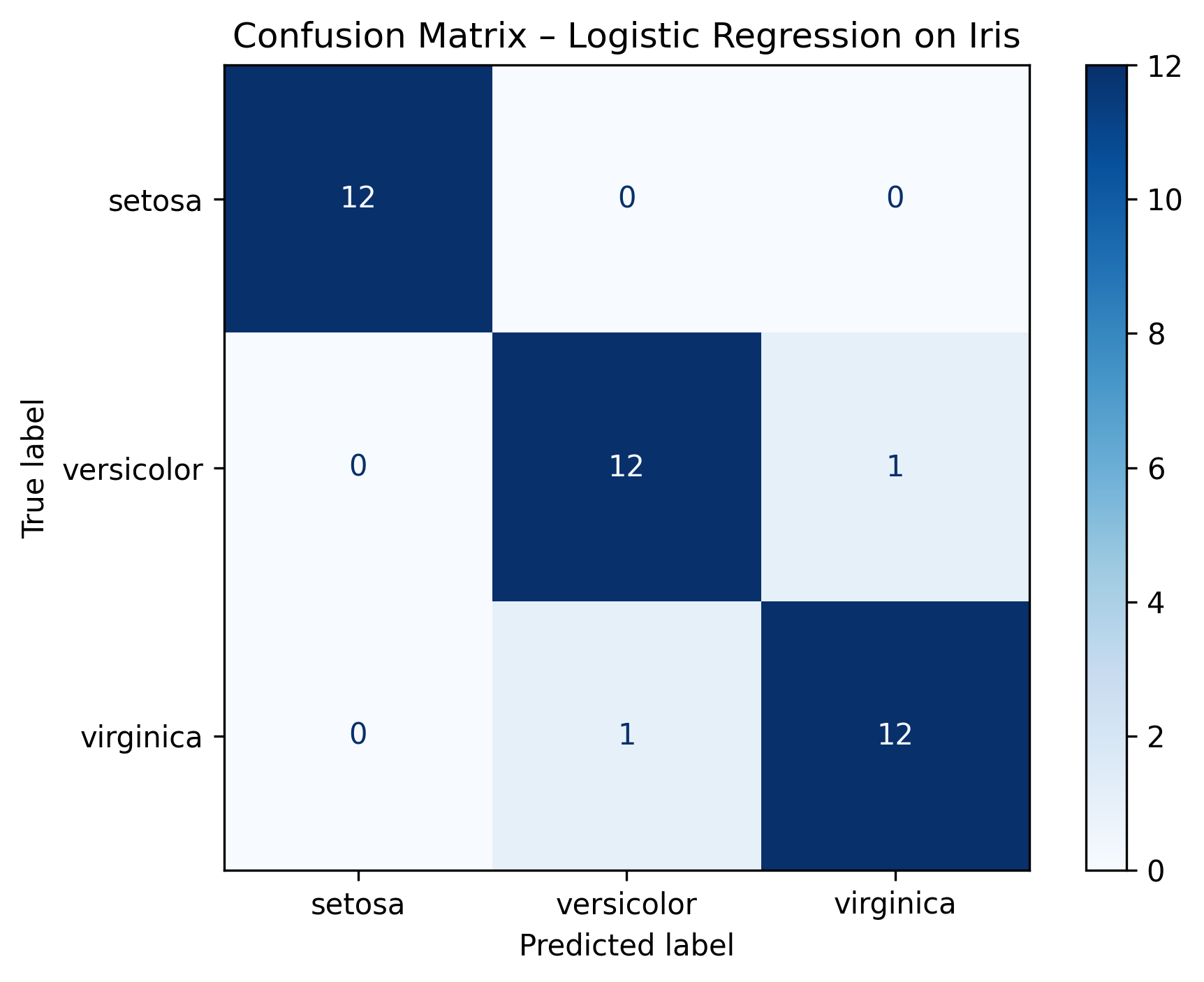
Figure: Confusion Matrix - Logistic Regression on Iris
Practical Use Cases
Confusion matrices are widely used in:
- 📧 Spam Detection → Classify emails as spam/not spam
- 🩺 Medical Diagnosis → Detect diseases with minimal false negatives
- 💳 Fraud Detection → Catch fraudulent transactions without flagging too many legitimate ones
- 💬 Sentiment Analysis → Classify text as positive, negative, or neutral
Pro Tips for Model Evaluation
- Always visualize the confusion matrix (heatmaps make it easier to interpret)
- For imbalanced datasets, focus on precision, recall, and F1-score
- Use classification reports for a complete performance breakdown
Key Takeaways
- Confusion Matrix gives a detailed view of classification performance.
- Accuracy Score is simple but can be misleading if classes are imbalanced.
- Visualization can make interpreting results much easier.
Code Snippet:
# Import required libraries
from sklearn.datasets import load_iris
from sklearn.model_selection import train_test_split
from sklearn.linear_model import LogisticRegression
from sklearn.metrics import confusion_matrix, accuracy_score, ConfusionMatrixDisplay
import matplotlib.pyplot as plt


iris = load_iris()
X, y = iris.data, iris.target

X_train, X_test, y_train, y_test = train_test_split(
    X, y, test_size=0.25, random_state=42, stratify=y
)


model = LogisticRegression(max_iter=1000, random_state=42)
model.fit(X_train, y_train)


y_pred = model.predict(X_test)


cm = confusion_matrix(y_test, y_pred, labels=model.classes_)
acc = accuracy_score(y_test, y_pred)
print("Accuracy:", round(acc, 4))
print("Confusion Matrix:\n", cm)


disp = ConfusionMatrixDisplay(confusion_matrix=cm, display_labels=iris.target_names)
disp.plot(cmap="Blues")
plt.title("Confusion Matrix – Logistic Regression on Iris")
plt.tight_layout()
plt.show()


No comments yet. Be the first to comment!